LEAN Local SEO
Tag your website links on Google Business Profile
It'll skyrocket your insights in Google Analytics.
by Shawn Joshi
Tagging your links on Google Business is easy - and pays massive dividends.
Here's how to do it.
Add UTM parameters to your website links.
Think of these as "tags" that you add to your website links. They'll track the source of your traffic.
These are the parameters I regularly use:
?utm_source=gmb&utm_medium=organic
done!
click to copy
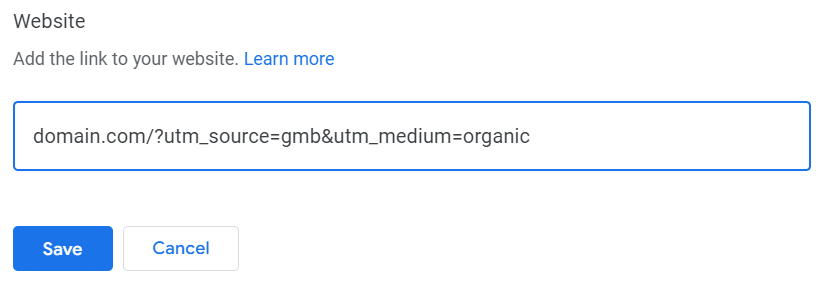
If your website is domain.com - this is what you'd add to your listing:
Track traffic and conversions in Google Analytics.
Most of my readers use Google Analytics - so I'm focusing on that. But the process is similar for other platforms.
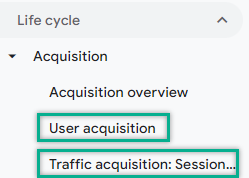
#1 Navigate to the Traffic or User Acquisition report.
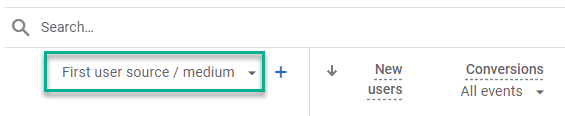
#2 Use the table's drop-down to select source/medium.
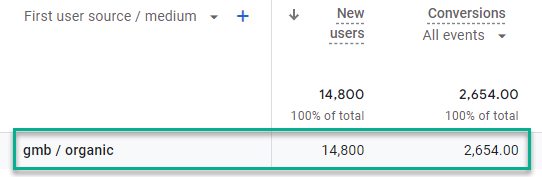
#3 View traffic and conversions.
Boom:
Why this is useful
Once you have access to this data, you can use it to make better marketing decisions.
Examples:
- Track your listing's performance over different periods.
- Compare the performance of Google Business to other traffic channels.
- If you have multiple listings, you can see which ones are driving the bulk of traffic and conversions.
And if you really want to nerd out - you can view keyword and ranking data in Google Search Console :)